How to delete partition
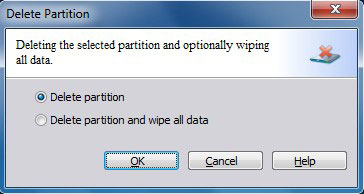
To delete a partition, first select the partition you would like to delete. There are three ways to initiate the Delete Partition function:
a. Click Partitions in the top menu » click Delete.
b. Click Delete in the Tool Bar.
c. Click Delete partition under Partition Operations in the Action Panel.
Attention: You cannot delete system partition, as it'll cause current OS failed to boot.
If you select the second partition, the files will be wiped and they cannot be recovered by data recovery software.